Vibe99
One developer now runs four or five coding agents at once. Traditional terminals give you two bad choices: tabs hide background agents until you forget they finished, while split grids shrink every pane until you cannot read any of them.
Vibe99 is a desktop terminal workspace built for one focused pane, peripheral vision on the rest. You read and command one agent at full width, while the others stay stacked on screen so you can see every session move at a glance.
一个人同时跑四五个 Coding Agent 已经是常态。但传统终端只有两种糟糕的选择:切标签页会把后台 Agent 彻底藏起来,跑完了也忘看;十字分屏又把每个窗口挤成豆腐块,哪一个都看不清。
所以我做了 Vibe99——一个按 「一主聚焦、余光巡视」 设计的 Agent 终端工作台。当前操作的终端永远保持全宽可读,其余终端层叠在侧,所有 Agent 的动静尽收眼底。
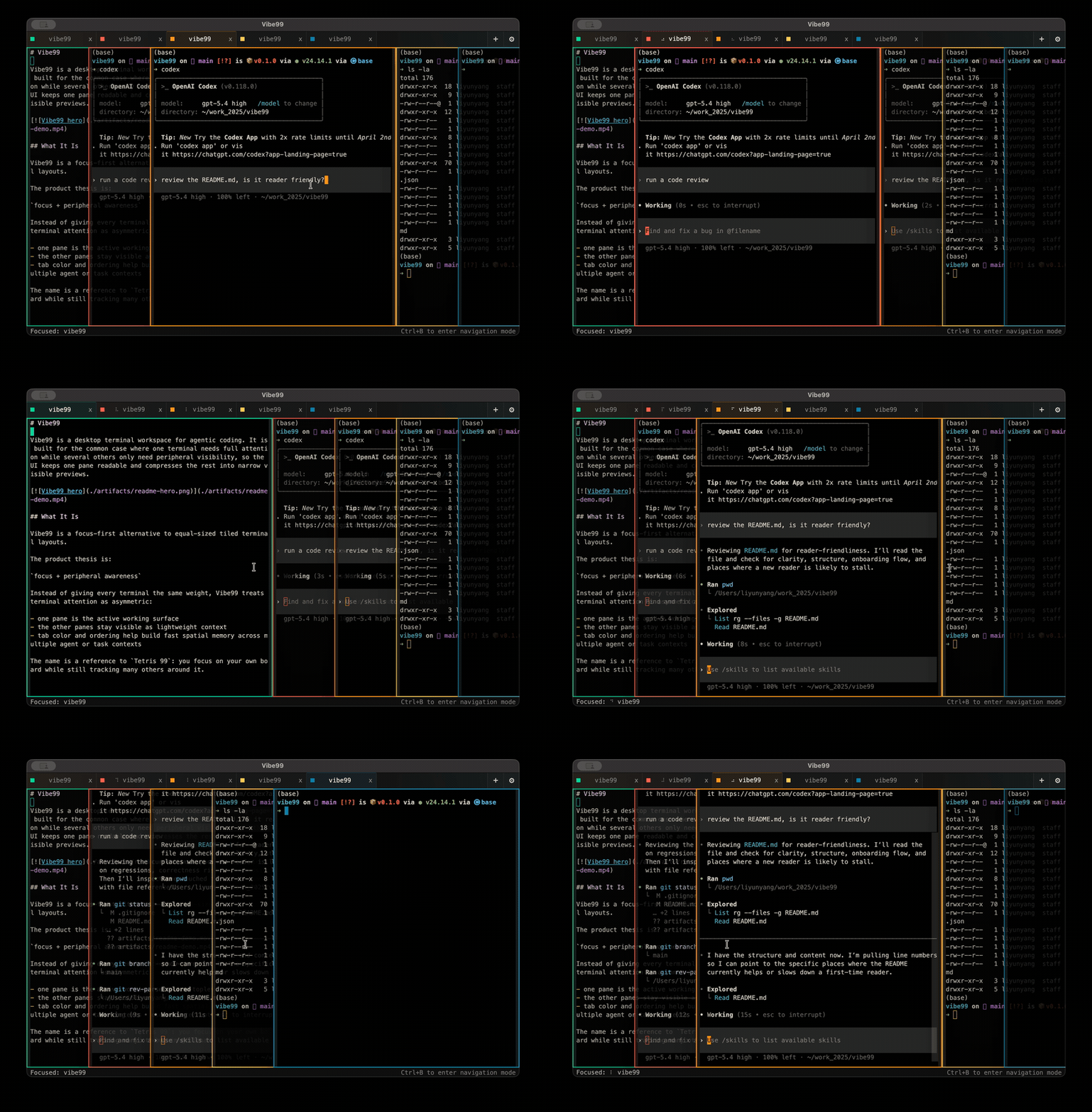
- Stacked layout at a glance. Your active terminal stays wide and readable in the foreground while background panes stack along the edges. You can always see which agents are still streaming output and which ones are waiting for your next prompt.
- High-contrast palette to lock onto any agent visually. Built on the Okabe-Ito colorblind-safe divergent palette, each pane gets a distinct accent color across its tab and background mask so your eyes lock onto the right agent immediately.
- Fully customizable UI. Tune active pane width, pane opacity, background mask opacity, and any installed monospace font until the workspace fits your screen and reading habits.
- Full keyboard control, zero mouse required. Cycle recent panes with
Ctrl+Tab, step left or right withCtrl+LeftandCtrl+Right, fuzzy-search tabs via the command palette (Ctrl+Shift+O), or enter Vim-style navigation mode (Ctrl+B) to jump, create, rename, and close panes purely from the keyboard. Every shortcut is remappable. - Native Tauri 2 + Rust performance. Powered by Tauri 2 and WebGL-accelerated rendering in a ~5 MiB native installer. Launches fast, stays light on memory, and automatically restores your pane layout, working directories, and tab titles on restart.
- Power features for multi-agent workflows. Optional breathing alerts softly pulse a background pane when its output finishes settling; customizable Shell Profiles let you configure and switch shells per pane; and Windows WSL integration discovers your installed Linux distributions in one click.
Getting started
- Download a release. Windows (
.msi,-setup.exe) and Linux (.deb,.AppImage,.rpm) installers are published on GitHub Releases. - Preferred for source builds: let your agent do it. Copy
https://github.com/NekoApocalypse/Vibe99into your coding agent (Claude Code, Codex, Antigravity, or OpenCode) and ask it to build and launch Vibe99. - Build it yourself. Requires Node.js 22+ and a stable Rust toolchain.
To package native release installers for your platform:npm ci npm run tauri:devnpm run tauri:build
Controls
| Shortcut | Action |
|---|---|
Ctrl+N (Cmd+N on macOS) | Open a new terminal pane |
Ctrl+Tab / Ctrl+Shift+Tab | Cycle through recently visited panes |
Ctrl+Left / Ctrl+Right | Move focus to the adjacent pane on the left or right |
Ctrl+Shift+O (Cmd+Shift+O) | Open the command palette and jump to any pane by title |
Ctrl+B | Enter navigation mode (H/L or arrows to move, 1–9 to jump, N new, R rename, X close, Enter focus) |
Ctrl+Shift+C / Ctrl+Shift+V | Copy or paste in the focused terminal |
Ctrl+Shift+M | Recover mouse input after an interrupted SSH or TUI session |
Double-click any tab to rename it, drag tabs to reorder panes, or right-click a tab to switch its shell profile, color, or activity alert. All shortcuts can be customized under Settings → Keyboard Shortcuts.
Limitations
- Release platforms: Prebuilt installers target Windows (x64) and Linux (x86_64). macOS users can build and run from source (
npm run tauri:build), as prebuilt macOS artifacts are paused until Apple signing and notarization are worth the cost. - Windows code signing: SignPath Foundation onboarding is in progress (Code signing policy). Releases up to
v0.7.3are unsigned and may show a Windows SmartScreen prompt on first launch. - Out of scope: Code editors, file trees, Git GUIs, and remote agent daemons. Vibe99 is a fast, focused terminal workspace for running and supervising agents—pair it with Owlet when you want a fast reader and editor for the files your agents produce.
Vibe99 — 多 Agent 终端工作台
- 层叠布局,一览无余:主窗口大宽度居中清晰呈现,其余终端层叠排布在视野两侧,不用来回切窗口也能一眼看清每个 Agent 是在跑任务还是在等指令。
- 高辨识度调色盘,用视觉锁定 Agent:内置 Okabe-Ito 高对比度调色盘,每个面板的标签页与背景蒙版都带有专属主题色,多开窗口时靠直觉和颜色就能瞬间锁定目标 Agent。
- UI 全面可调:主面板宽度、终端透明度、后台蒙版浓度,以及本机任意等宽字体均可自由调节,按你的屏幕尺寸与阅读习惯定制最舒服的视野。
- 丰富的快捷键支持,纯键盘也能行云流水:支持
Ctrl+Tab按最近访问切换、Ctrl+Left/Ctrl+Right左右平移、Ctrl+Shift+O呼出命令面板模糊搜索,或按Ctrl+B进入导航模式(H/L移动、数字键1–9直达、新建/重命名/关闭面板),所有快捷键均支持自定义。 - Tauri 2 + Rust 原生轻量体验:基于 Tauri 2 与 WebGL 硬件加速渲染打造,原生安装包仅 ~5 MiB,启动快、内存占用低、滚屏丝滑,重启后自动恢复面板布局、工作目录与标签页标题。
- 更多贴合多 Agent 的进阶功能:支持呼吸灯提醒(后台 Agent 输出结束静止后柔光闪烁提示)、Shell Profiles 管理(按面板自由切换或定制不同终端环境)以及 Windows WSL 支持(一键探测并接入本机已安装的 Linux 发行版)。
快速开始
- 直接下载安装包。 前往 GitHub Releases 下载 Windows(
.msi、-setup.exe)或 Linux(.deb、.AppImage、.rpm)安装包。 - 从源码构建(推荐交给你的 Agent)。 把仓库地址
https://github.com/NekoApocalypse/Vibe99丢给你常用的 Coding Agent(Claude Code、Codex、Antigravity、OpenCode 等),让它直接构建并启动 Vibe99。 - 手动构建。 环境要求:Node.js 22+ · Rust stable 工具链。
打包当前平台的原生安装包:npm ci npm run tauri:devnpm run tauri:build
常用快捷键
| 快捷键 | 功能 |
|---|---|
Ctrl+N(macOS 为 Cmd+N) | 新建终端面板 |
Ctrl+Tab / Ctrl+Shift+Tab | 按最近访问记录在面板间切换 |
Ctrl+Left / Ctrl+Right | 向左 / 向右切换到相邻面板 |
Ctrl+Shift+O(Cmd+Shift+O) | 打开命令面板,模糊搜索标题并跳转 |
Ctrl+B | 进入导航模式(H/L 或方向键移动,1–9 直达,N 新建,R 重命名,X 关闭,Enter 聚焦) |
Ctrl+Shift+C / Ctrl+Shift+V | 在当前终端内复制 / 粘贴 |
Ctrl+Shift+M | SSH 或 TUI 异常中断后一键恢复鼠标输入状态 |
当前局限
- 平台安装包:目前提供 Windows (x64) 与 Linux (x86_64) 预编译安装包。macOS 预编译包在 Apple 签名与公证成本划算前暂停发布,macOS 用户可直接从源码构建运行(
npm run tauri:build)。 - Windows 代码签名:正在接入 SignPath Foundation 开源签名(详见 Code Signing Policy)。
v0.7.3及更早版本的 Windows 安装包尚未签名,首次运行可能触发系统 SmartScreen 提示。 - 不做的功能:内置代码编辑器、文件树、Git 图形界面或远端常驻守护进程。Vibe99 专注于让你高效并行操控多个终端 Agent——如果你需要极速审阅和编辑 Agent 产出的文档与代码,推荐配合 Owlet 一起使用。